Phishing email example · Tactic: Helpfulness
GitHub phishing email example: fake email verification
This GitHub phishing email asks you to verify your email address to finish a GitHub sign-up. The tell is the sender, GitHub@bigdogdomains.co, which is not GitHub. If you didn’t just create an account, there is nothing to verify, and the button most likely leads to a fake GitHub sign-in.
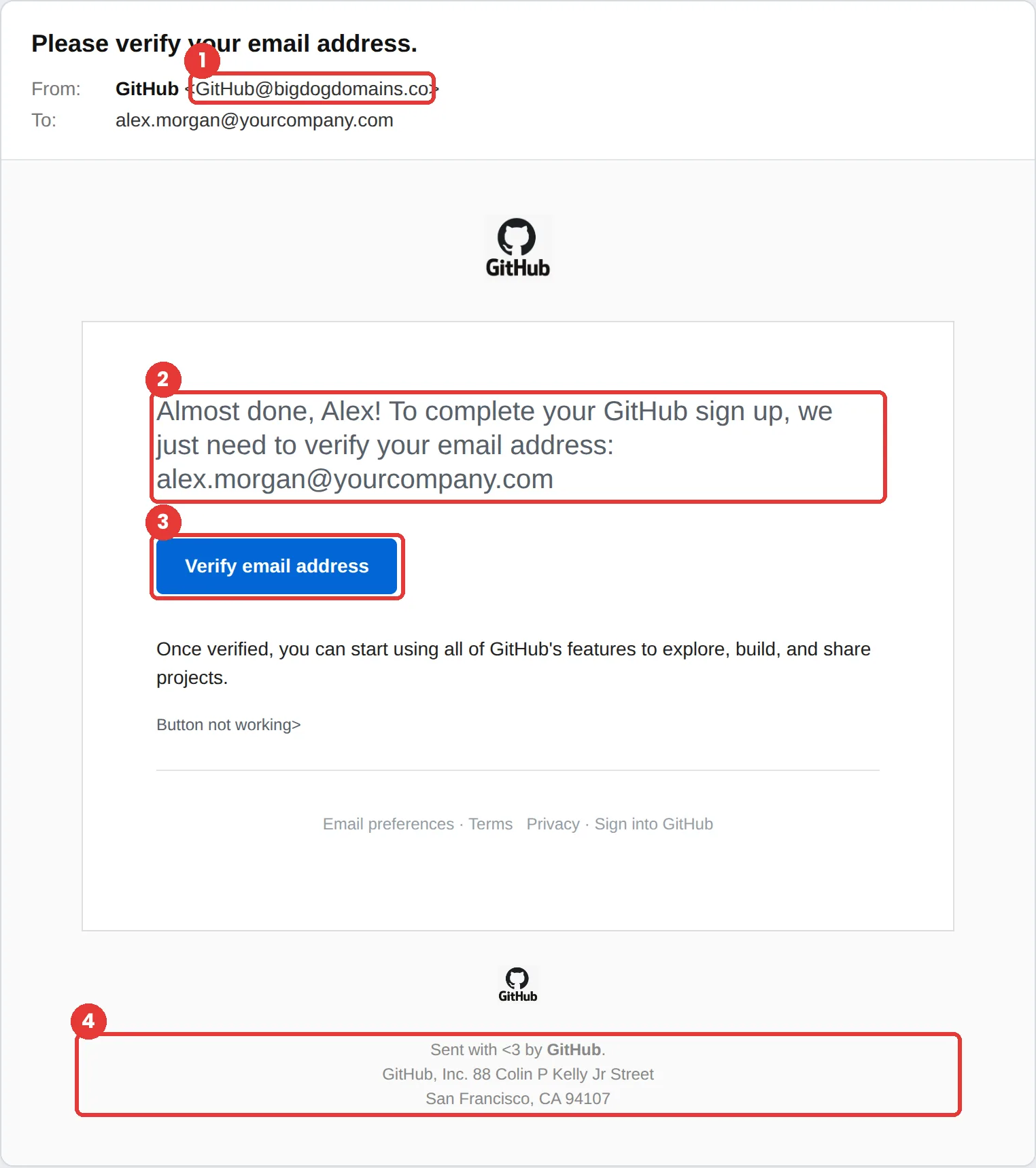
The red flags
- Subject
- Please verify your email address.
- From
- GitHub@bigdogdomains.co
- 1
The sender domain
bigdogdomains.co is not GitHub.
- 2
A sign-up you didn’t start
If you already have an account, or didn’t just register, an “almost done” email makes no sense.
- 3
A button that asks for a password
Verifying an email address should never require you to sign in on an unfamiliar page.
- 4
A real address used as cover
Accurate footer details, like a real street address, are easy to copy and prove nothing.
Why this GitHub scam works
Verification emails are the most boring, routine messages on the internet. Clicking them is a reflex, and that reflex is exactly what this template targets.
It copies GitHub’s real layout, including the Octocat logo and GitHub’s actual headquarters address in the footer. Developers get these constantly, and a stolen GitHub login can expose source code and secrets.
The tactic: Helpfulness. It asks for a small favour. Most people want to be useful, especially at work. See all six tactics.
Who gets this email
Developers, IT teams and anyone with access to company code. One stolen GitHub login can expose private repositories and the keys inside them, so these messages are aimed at technical staff who assume they would never fall for one.
Other versions of this scam
- A fake security alert about a leaked token or an unusual sign-in.
- A fake CI/CD failure notice that links to a “build log.”
- An invitation to a repository or organization that asks you to sign in.
Check it in 30 seconds
- Read the sender domain; lookalikes are common.
- Ask yourself whether you just signed up or changed your email.
- Sign in to github.com directly and check your notifications and settings.
- Use a passkey or hardware key so a fake sign-in page can’t capture a usable login.
What happens if someone clicks
The verify button in an email like this usually leads to a copy of the GitHub sign-in page. With the password, and sometimes the two-factor code captured in real time, an attacker can clone private repositories, read secrets stored in code, add their own access keys, and push malicious changes that look like they came from you.
How to report a GitHub phishing email
- At work, use your email’s Report Phishing button, or forward the message to your IT or security team, before anything else. They can pull the same email from everyone else’s inbox.
- GitHub asks people to contact GitHub Support with the sender’s email address and the URL of the malicious site. GitHub security alert
- Forward the email to the Anti-Phishing Working Group at reportphishing@apwg.org. APWG reporting
Already clicked? Close the page, change the password for any account you entered, sign out of active sessions, and report it anyway. Speed matters far more than blame.
Questions about GitHub phishing emails
It helps, but real-time phishing kits can relay one-time codes. Passkeys and hardware security keys are much stronger because they will not work on a lookalike site.
Sign in to github.com directly and look at your email settings. If an address needs verifying, GitHub will show it there and let you resend the email.
A GitHub login can expose private repositories, API keys and access to production systems, which makes it far more valuable than most personal accounts.
It is a phishing simulation template from Hook Security’s library, modelled on real attacks. Links and tracking have been removed from the screenshot.
Give your team a safe first encounter with emails like this.
Hook sends realistic simulations built from real attacks, then a short training moment right after any click. It runs on Autopilot.