Phishing email example · Tactic: Urgency
Amazon phishing email example: fake account locked notice
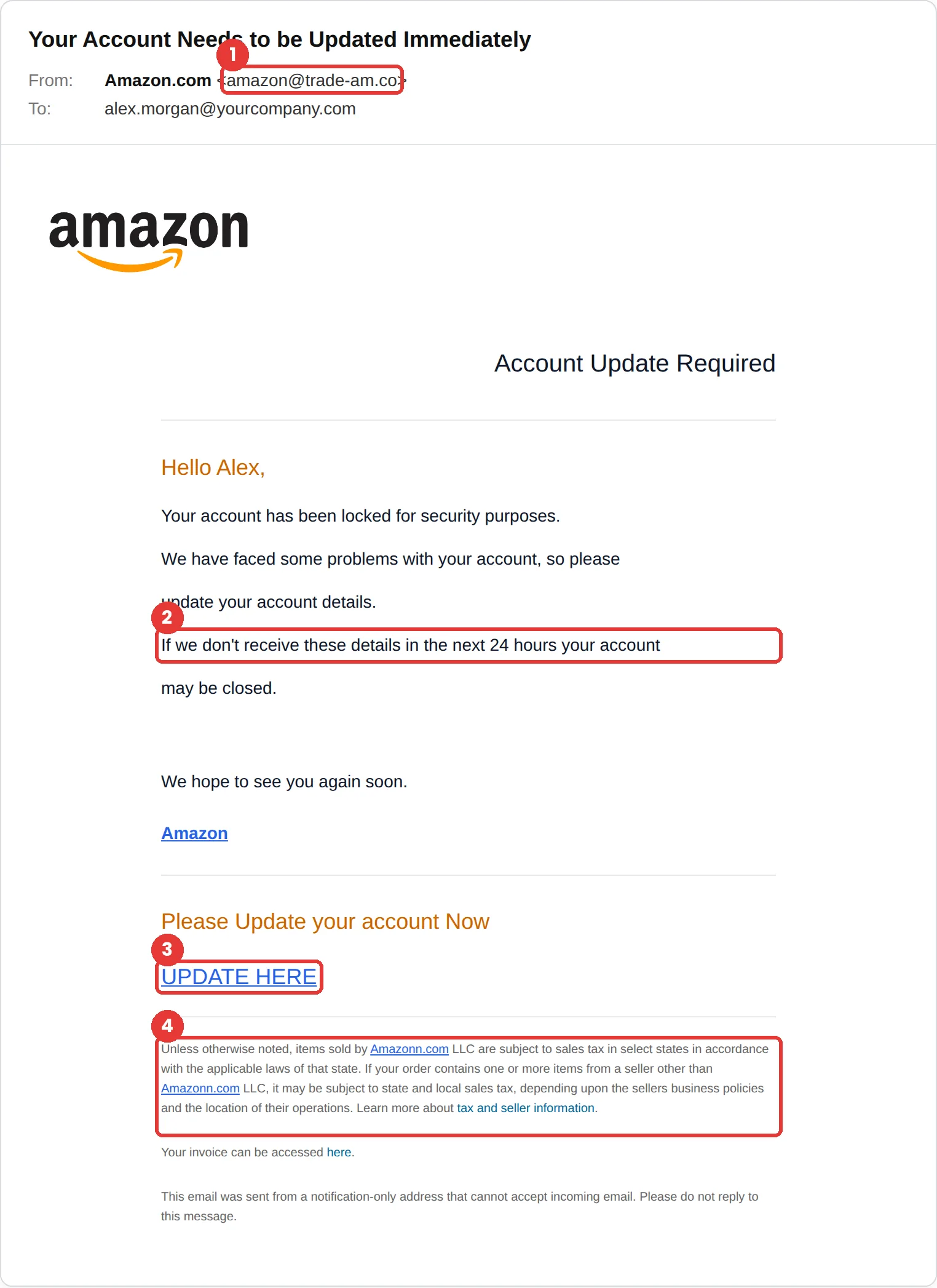
This Amazon phishing email says your account has been locked and may be closed unless you update your details within 24 hours. The tell is the sender, amazon@trade-am.co, which is not an Amazon address. The small print even misspells the company as “Amazonn.com.”
The red flags
- Subject
- Your Account Needs to be Updated Immediately
- From
- amazon@trade-am.co
- 1
A lookalike sender
trade-am.co is not Amazon.
- 2
A 24-hour deadline
Threatening to close the account if you don’t act within a day is classic pressure.
- 3
A bare Update Here link
No order, no reason, just a link to “update your account details.”
- 4
Misspelled small print
The footer names “Amazonn.com” twice. A doubled letter in the legal text gives this one away.
Why this Amazon scam works
Losing an Amazon account means losing order history, Prime and saved payment methods, and the email puts a 24-hour clock on it. A short deadline leaves little room to stop and check.
The layout borrows real parts of Amazon email: the logo, the orange greeting and dense legal small print about sales tax. Most people never read that small print, so it only has to look right, not be right.
The tactic: Urgency. A deadline collapses the gap between reading and acting. You react before you evaluate. See all six tactics.
Who gets this email
Amazon customers, which in the US is most households. It is sent in huge volume because almost anyone who receives it has an account, and people who shop often are used to Amazon emails about their account.
Other versions of this scam
- An order confirmation for an expensive item you didn’t buy, with a “cancel order” link.
- A Prime renewal or payment-declined notice.
- A text or phone call claiming to be Amazon about a suspicious purchase.
Check it in 30 seconds
- Read the sender domain.
- Open the Amazon app, or type amazon.com yourself, and check your orders and messages.
- Look for spelling mistakes, especially in the small print.
- Never update payment details from a link in an email.
What real Amazon email looks like
- Amazon says it will not ask for payment over the phone or by email, only in its app, on its website or in its stores, and that it will never ask you to buy a gift card. Source: About Amazon
What happens if someone clicks
The Update Here link usually leads to a fake Amazon sign-in page, followed by forms for your address, card details and sometimes your Social Security number to “verify” your identity. The attacker can then shop with your saved cards, change your delivery address and use your personal details for identity theft.
How to report a Amazon phishing email
- At work, use your email’s Report Phishing button, or forward the message to your IT or security team, before anything else. They can pull the same email from everyone else’s inbox.
- Amazon asks for suspicious messages to be reported at amazon.com/reportascam, or by email to reportascam@amazon.com, even if you are not an Amazon customer. Amazon scam prevention
- If you lost money or shared personal details, report it to the FTC. ReportFraud.ftc.gov
Already clicked? Close the page, change the password for any account you entered, sign out of active sessions, and report it anyway. Speed matters far more than blame.
Questions about Amazon phishing emails
Amazon says it will only ask for payment in its app, on its website or in its stores, not by email. If you think something is wrong with your account, open the app or type amazon.com yourself.
Amazon asks for suspicious messages to be reported at amazon.com/reportascam or by email to reportascam@amazon.com. At work, report it to your IT or security team first.
Because most people never read it, it only has to look official. Reading it is often where mistakes show up, like the “Amazonn.com” in this one.
It is a phishing simulation template from Hook Security’s library, modelled on real attacks. Links and tracking have been removed from the screenshot.
Give your team a safe first encounter with emails like this.
Hook sends realistic simulations built from real attacks, then a short training moment right after any click. It runs on Autopilot.