Phishing email example · Tactic: Urgency
PayPal phishing email example: fake suspicious activity alert
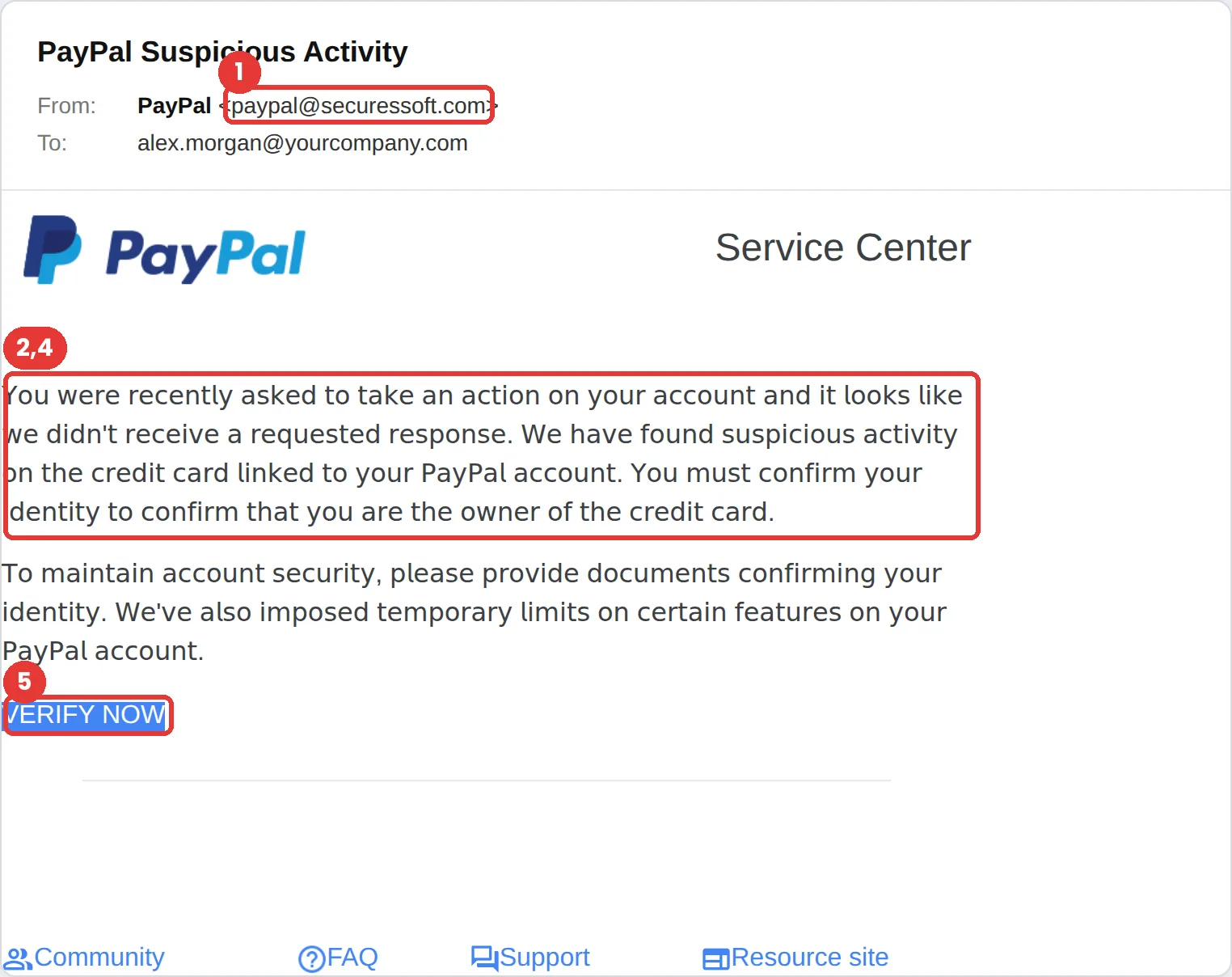
This PayPal phishing email claims suspicious activity on the card linked to your account, says limits have been placed on it, and asks you to “Verify Now” with identity documents. The tell is the sender, paypal@securessoft.com. PayPal says to forward suspicious emails to phishing@paypal.com.
The red flags
- Subject
- PayPal Suspicious Activity
- From
- paypal@securessoft.com
- 1
The sender domain
securessoft.com is not PayPal. The display name says PayPal; the address underneath does not.
- 2
No name, just “your account”
PayPal says real messages address you by your first and last name or your business name, not a generic greeting.
- 3
Hidden leftovers
Invisible text in the email’s code signs off as “The Google Workspace Referral Team,” left over from a different template. You can’t see it, but filters and security tools can.
- 4
Strange-looking text
The body uses lookalike Unicode characters to dodge filters. If text looks slightly “off,” it probably is.
- 5
Identity documents by email link
Never upload ID through a link in an email. Sign in to PayPal directly and check the Message Center.
Why this PayPal scam works
Account limits on money you can’t access are frightening, and the email asks for “documents confirming your identity,” which feels like a legitimate security step rather than a scam.
The text is written in unusual Unicode letters that look like normal type to a person but not to a spam filter. That is a deliberate evasion trick, and a strong clue once you know to look for it.
The tactic: Urgency. A deadline collapses the gap between reading and acting. You react before you evaluate. See all six tactics.
Who gets this email
Anyone with a PayPal account, and small businesses that take payments through it. Account-limit scams work because losing access to money feels urgent in a way few other threats do.
Other versions of this scam
- A fake invoice or money request for a purchase you never made, with a phone number to “dispute” it.
- A “you’ve received a payment” notice that asks you to sign in to accept it.
- A refund notice that asks for your card or bank details.
Check it in 30 seconds
- Check that the email uses your real name, as PayPal says it will.
- Read the sender domain, not the display name.
- Sign in directly and check your account and messages.
- Forward suspicious PayPal emails to phishing@paypal.com, then delete them.
What happens if someone clicks
The Verify Now button in an email like this usually leads to a copy of the PayPal login page, followed by forms asking for card details, a photo of your ID and sometimes a selfie. That combination is enough to take over the account and open new accounts in your name, which is why identity-document requests are the most dangerous part of this template.
How to report a PayPal phishing email
- At work, use your email’s Report Phishing button, or forward the message to your IT or security team, before anything else. They can pull the same email from everyone else’s inbox.
- PayPal says to forward the entire email to phishing@paypal.com, then delete it. Don’t click links, call numbers or open attachments in the message. PayPal: report suspicious messages
- If you lost money or shared personal details, report it to the FTC. ReportFraud.ftc.gov
Already clicked? Close the page, change the password for any account you entered, sign out of active sessions, and report it anyway. Speed matters far more than blame.
Questions about PayPal phishing emails
Report it to the FTC at IdentityTheft.gov, place a fraud alert with the credit bureaus, and change your PayPal password from the real site. Watch your accounts closely for new activity.
PayPal says to forward the whole email to phishing@paypal.com and then delete it, without clicking links, calling numbers or opening attachments. At work, report it to your IT team as well.
If PayPal really needs information, you will see the request after signing in to your account directly. Don’t upload documents through a link in an email.
It is a phishing simulation template from Hook Security’s library, modelled on real attacks. Links and tracking have been removed from the screenshot.
Give your team a safe first encounter with emails like this.
Hook sends realistic simulations built from real attacks, then a short training moment right after any click. It runs on Autopilot.