Phishing email example · Tactic: Urgency
Credit Karma phishing email example: fake tax return rejection
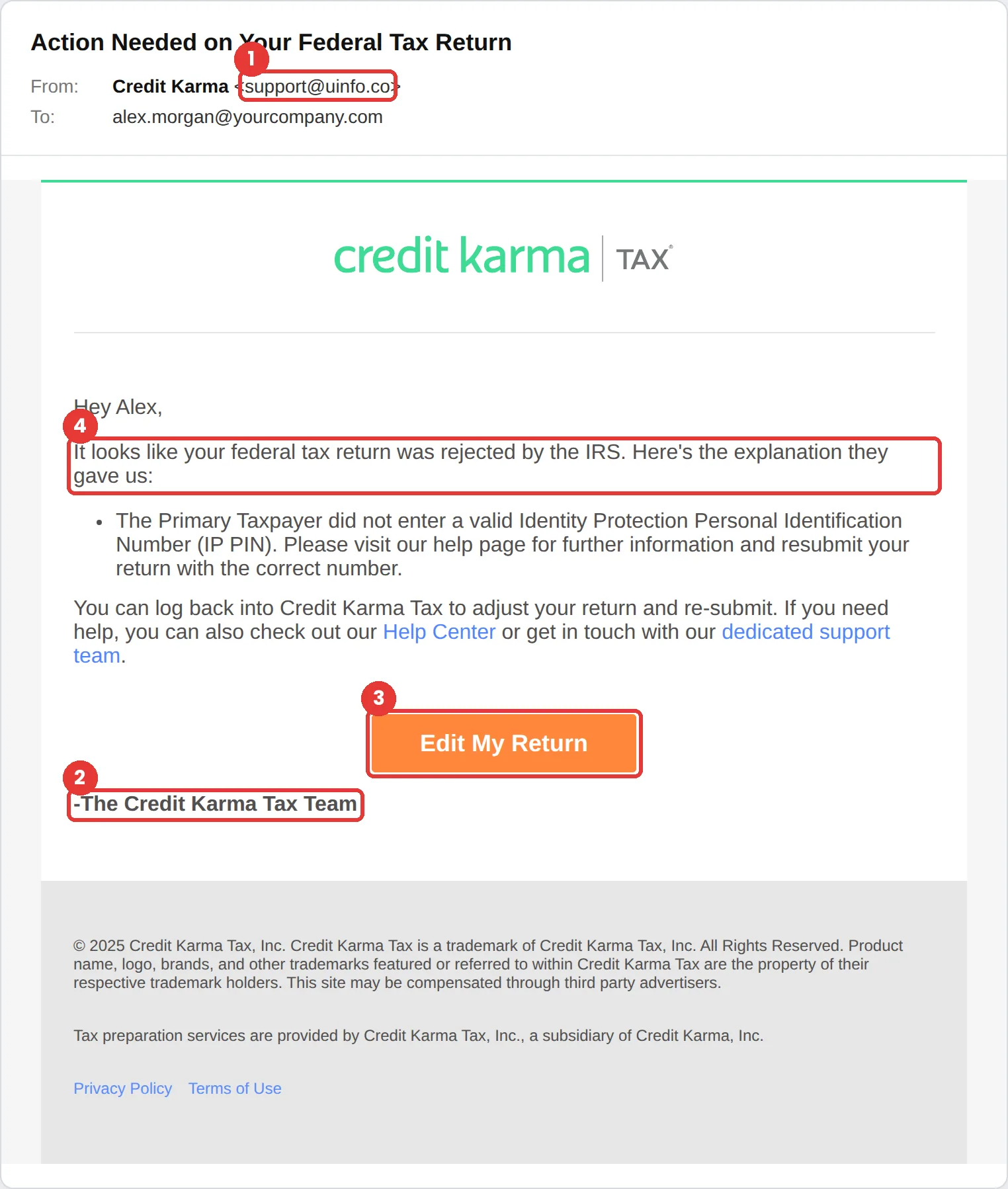
This Credit Karma phishing email claims the IRS rejected your federal tax return and pushes you to “Edit My Return.” The fastest tell is the sender: support@uinfo.co is not a Credit Karma address. The second tell is bigger: Credit Karma no longer prepares tax returns at all.
The red flags
- Subject
- Action Needed on Your Federal Tax Return
- From
- support@uinfo.co
- 1
The sender domain
support@uinfo.co has nothing to do with Credit Karma. The display name does all the work.
- 2
A service that no longer exists
Credit Karma Tax was sold to Square in 2020 and became Cash App Taxes. A “Credit Karma Tax Team” asking you to resubmit a return is a giveaway on its own.
- 3
A problem you can only fix by clicking
The only path offered is the orange Edit My Return button. A real rejection can always be checked by signing in to your tax provider directly.
- 4
IRS pressure without IRS contact
Rejections come through the software you actually filed with. The IRS does not route them through a credit-monitoring brand’s marketing email.
Why this Credit Karma scam works
Tax season makes everyone a little anxious, and “your return was rejected by the IRS” lands on exactly that worry. The email borrows a real IRS concept, the Identity Protection PIN, so the explanation sounds technical and specific rather than vague.
It also uses Credit Karma’s real green branding and familiar legal footer. People who once filed with Credit Karma Tax recognise the look instantly, and recognition is what lowers scrutiny.
The tactic: Urgency. A deadline collapses the gap between reading and acting. You react before you evaluate. See all six tactics.
Who gets this email
Anyone who has used Credit Karma, and especially anyone who filed taxes online in the last few years. It spikes from January to April, when a message about a rejected return feels timely rather than strange.
Other versions of this scam
- A “your credit score dropped” alert that asks you to sign in to see why.
- A fake identity-monitoring warning about a new account opened in your name.
- A refund or “unclaimed money” notice that asks for bank details to release it.
Check it in 30 seconds
- Read the sender address, not the display name.
- Ask whether you actually use this service for this purpose today.
- Open the app or type the website yourself and look for the same message.
- If it involves the IRS, check your status at IRS.gov directly.
What real Credit Karma email looks like
- Credit Karma Tax became Cash App Taxes after Square’s 2020 acquisition, so current Credit Karma email will not ask you to edit or resubmit a tax return. Source: Square press release
What happens if someone clicks
The Edit My Return button in an email like this usually leads to a copy of a tax or Credit Karma sign-in page. Anything typed there, such as an email address, password, Social Security number or bank details for a refund, goes straight to the attacker. Tax identity theft is especially damaging because a fraudster can file a return in your name and collect the refund before you do, and untangling it with the IRS takes months.
How to report a Credit Karma phishing email
- At work, use your email’s Report Phishing button, or forward the message to your IT or security team, before anything else. They can pull the same email from everyone else’s inbox.
- Credit Karma does not publish a dedicated phishing-report address, so use the general channels below.
- Forward the email to the Anti-Phishing Working Group at reportphishing@apwg.org. APWG reporting
- If you lost money or shared personal details, report it to the FTC. ReportFraud.ftc.gov
Already clicked? Close the page, change the password for any account you entered, sign out of active sessions, and report it anyway. Speed matters far more than blame.
Questions about Credit Karma phishing emails
Yes. With your name, Social Security number and date of birth, a fraudster can file a return and claim a refund. An IRS Identity Protection PIN helps prevent that, which is one reason attackers mention it to sound credible.
Not anymore. Credit Karma Tax was sold to Square in 2020 and now operates as Cash App Taxes, so an email from a “Credit Karma Tax Team” about a rejected return should be treated as phishing.
Close the page without entering anything. If you typed a password, change it on the real site and turn on multi-factor authentication. If you entered a Social Security number or tax details, report it to the FTC and consider an IRS Identity Protection PIN.
It is a phishing simulation template from Hook Security’s library, modelled on real attacks. Links and tracking have been removed from the screenshot.
Give your team a safe first encounter with emails like this.
Hook sends realistic simulations built from real attacks, then a short training moment right after any click. It runs on Autopilot.