Phishing email example · Tactic: Urgency
GEICO phishing email example: fake declined payment notice
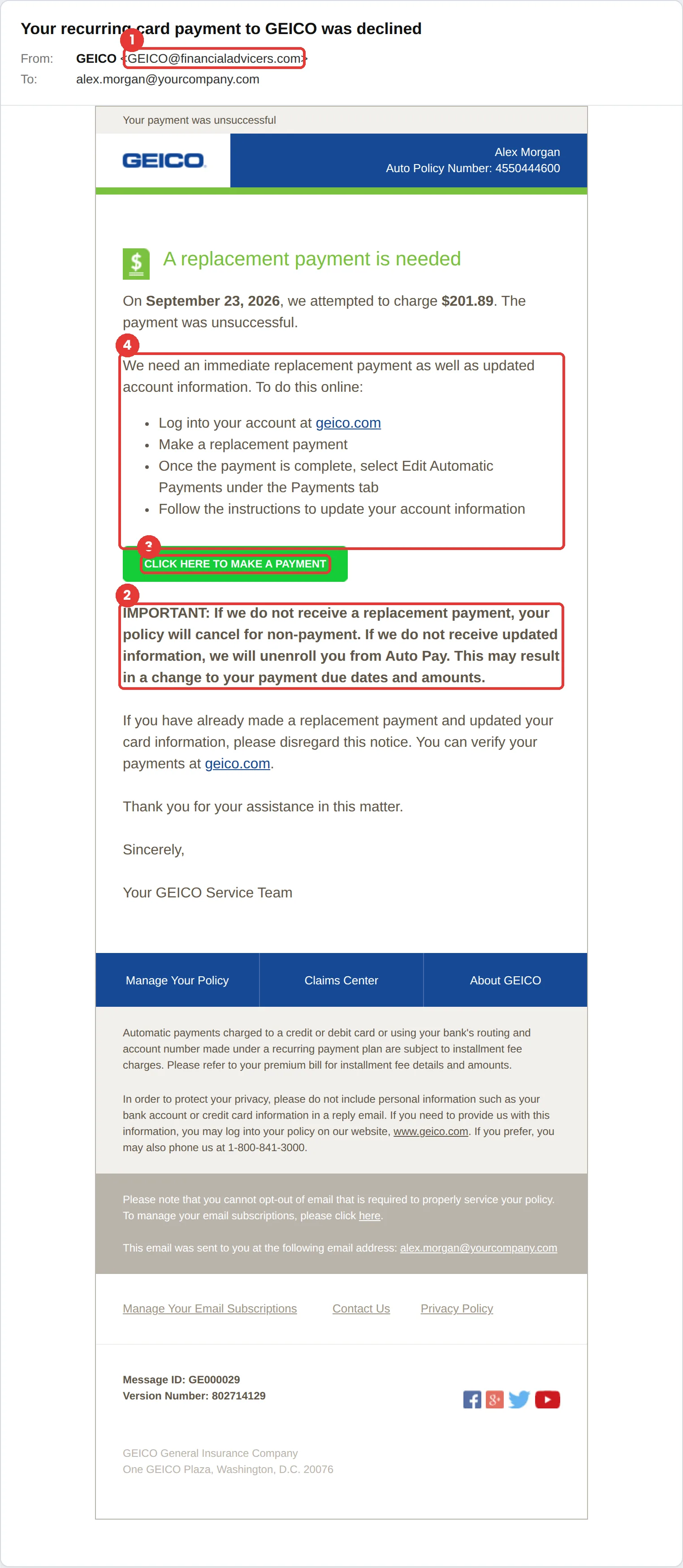
This GEICO phishing email says your recurring card payment was declined and your policy will cancel unless you make a replacement payment now. The tell is the sender, GEICO@financialadvicers.com, a misspelled lookalike domain. The goal is your card number and your GEICO login.
The red flags
- Subject
- Your recurring card payment to GEICO was declined
- From
- GEICO@financialadvicers.com
- 1
A misspelled lookalike domain
“financialadvicers.com” is not GEICO and is not even spelled correctly. A billing notice from an unrelated domain is not from your insurer.
- 2
Cancellation pressure
“Your policy will cancel for non-payment” is designed to make you act before you check.
- 3
The button contradicts the text
The steps say to log in at geico.com, but the big green button links elsewhere. Hover before you click.
- 4
Card details requested by email
Updating payment information should always happen inside the app or on the site you type in yourself.
Why this GEICO scam works
Losing car insurance is a real, expensive problem, and the email says it plainly: pay or your policy cancels. It even includes a specific amount and a policy number, which makes it feel like a genuine billing notice rather than a scam.
The design copies GEICO’s real billing emails closely: blue header, green call-to-action button, numbered steps and a dense legal footer. The instructions even tell you to “log into your account at geico.com,” which builds trust, right before the button sends you somewhere else.
The tactic: Urgency. A deadline collapses the gap between reading and acting. You react before you evaluate. See all six tactics.
Who gets this email
Drivers who pay by recurring card or bank draft, which is most policyholders. The message works best on people who changed cards recently, so it follows data breaches and card reissues closely.
Other versions of this scam
- A fake claim update asking you to upload photos or sign documents through a link.
- A “refund owed to you” notice that collects your bank account details.
- A proof-of-insurance or ID card email with a malicious attachment.
Check it in 30 seconds
- Read the sender domain letter by letter; lookalikes rely on you skimming.
- Hover over the button and compare it with the site named in the text.
- Sign in through the app or a site you type yourself to see your real balance.
- Never enter card details on a page you reached from an email.
What happens if someone clicks
The payment button in an email like this usually opens a convincing copy of an insurer’s payment page. Anything entered there, such as card number, expiry date, security code or login, can be used within minutes. Some versions also collect your policy number and driver’s licence details, which make later scams, like fake claims calls, far more believable.
How to report a GEICO phishing email
- At work, use your email’s Report Phishing button, or forward the message to your IT or security team, before anything else. They can pull the same email from everyone else’s inbox.
- GEICO’s own fraud page tells customers to report phishing emails to the Anti-Phishing Working Group at reportphishing@apwg.org. GEICO phishing scams page
- If you lost money or shared personal details, report it to the FTC. ReportFraud.ftc.gov
Already clicked? Close the page, change the password for any account you entered, sign out of active sessions, and report it anyway. Speed matters far more than blame.
Questions about GEICO phishing emails
If a payment really fails, the notice and your options will also be in your account on the app or website. Check there before acting on any cancellation warning that arrives by email.
Ignore the links and sign in to the GEICO app or geico.com by typing the address yourself. If a payment really failed, your account will show it.
GEICO’s fraud awareness page directs customers to report phishing emails to the Anti-Phishing Working Group at reportphishing@apwg.org. At work, report it to your IT team first.
It is a phishing simulation template from Hook Security’s library, modelled on real attacks. Links and tracking have been removed from the screenshot.
Give your team a safe first encounter with emails like this.
Hook sends realistic simulations built from real attacks, then a short training moment right after any click. It runs on Autopilot.