Phishing email example · Tactic: Scarcity
The Home Depot phishing email example: fake $5 coupon
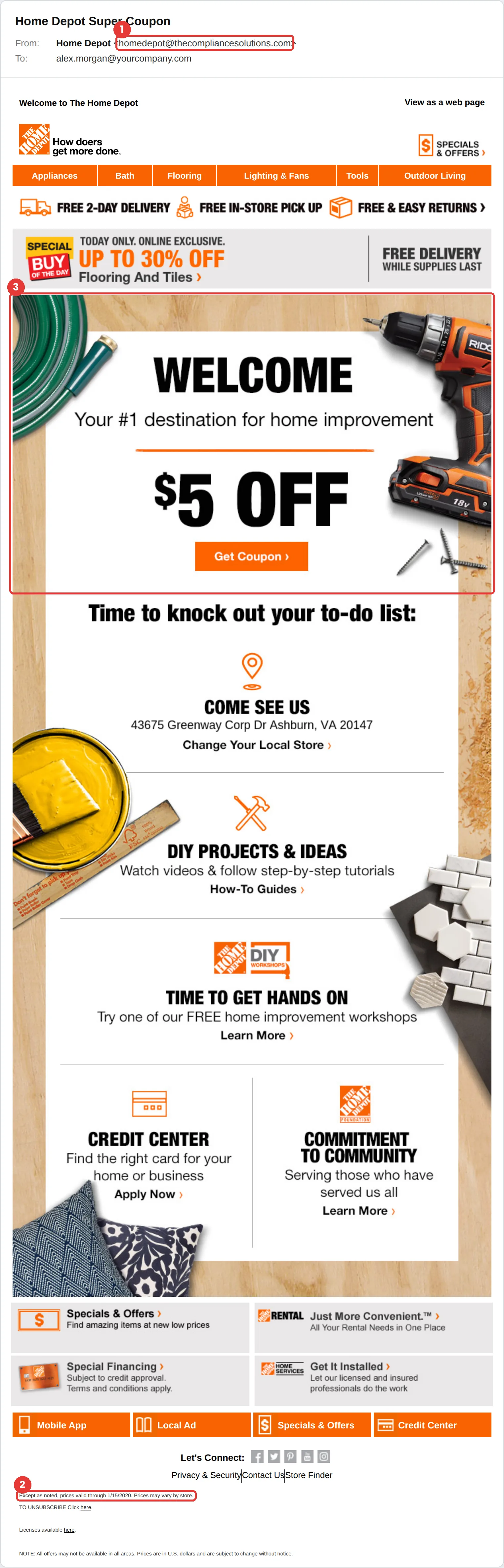
This Home Depot phishing email offers a $5 “Super Coupon” and a “Today only” flooring sale. The tell is the sender, homedepot@thecompliancesolutions.com, which is not a Home Depot domain. A second clue: the fine print says prices were valid through 1/15/2020.
The red flags
- Subject
- Home Depot Super Coupon
- From
- homedepot@thecompliancesolutions.com
- 1
The sender domain
thecompliancesolutions.com has nothing to do with The Home Depot.
- 2
Stale fine print
“Prices valid through 1/15/2020” shows the email was copied from an old real one and never updated.
- 3
A coupon that needs a click
Real offers also appear in the Home Depot app and on the site. Check there instead of clicking.
- 4
“Today only”
Time pressure on a tiny discount is designed to skip the pause where you would check the sender.
Why this Home Depot scam works
It is a near-perfect copy of a real Home Depot marketing email: orange navigation bar, product categories, store address, footer links. It looks like the email you already get every week, so it gets the same quick, trusting glance.
A small, believable reward ($5 off) paired with a “Today only” banner is a classic scarcity play. Small offers are more convincing than big ones.
The tactic: Scarcity. Something is running out. Fear of missing it overrides the instinct to check. See all six tactics.
Who gets this email
Homeowners, contractors and anyone on a retail marketing list. Retail coupon emails are so common that people skim them, which is exactly what makes a copy convincing.
Other versions of this scam
- A “you’ve won a gift card” or survey-reward email.
- A fake order or delivery confirmation for a big-ticket purchase.
- A store credit card alert asking you to confirm your account.
Check it in 30 seconds
- Check the sender domain first; the design proves nothing.
- Look for the same offer in the app or on the website you type yourself.
- Check the dates in the fine print for anything stale.
- Never enter card details to “claim” a coupon.
What happens if someone clicks
The Get Coupon button in an email like this usually leads to a survey, a prize claim or a lookalike sign-in page that asks for card details or a password “to verify your account.” Retail logins often hold saved cards, addresses and order history, all useful for fraud and for follow-up scams that reference real purchases.
How to report a Home Depot phishing email
- At work, use your email’s Report Phishing button, or forward the message to your IT or security team, before anything else. They can pull the same email from everyone else’s inbox.
- The Home Depot’s Fraud Center tells customers to report suspicious emails to their email provider and to the FTC at reportfraud.ftc.gov. Home Depot Fraud Center
- If you lost money or shared personal details, report it to the FTC. ReportFraud.ftc.gov
Already clicked? Close the page, change the password for any account you entered, sign out of active sessions, and report it anyway. Speed matters far more than blame.
Questions about Home Depot phishing emails
Because small offers look believable and people rarely stop to check them. The coupon is only there to get your login or card details, which are worth far more than five dollars to the attacker.
Check the sender domain, then look for the same offer in the Home Depot app or on homedepot.com by typing the address yourself. If it is not there, delete the email.
The Home Depot’s Fraud Center says to report it to your email provider and to the FTC at reportfraud.ftc.gov. At work, report it to your IT team first.
It is a phishing simulation template from Hook Security’s library, modelled on real attacks. Links and tracking have been removed from the screenshot.
Give your team a safe first encounter with emails like this.
Hook sends realistic simulations built from real attacks, then a short training moment right after any click. It runs on Autopilot.