Phishing email example · Tactic: Trust
DoorDash phishing email example: fake order confirmation
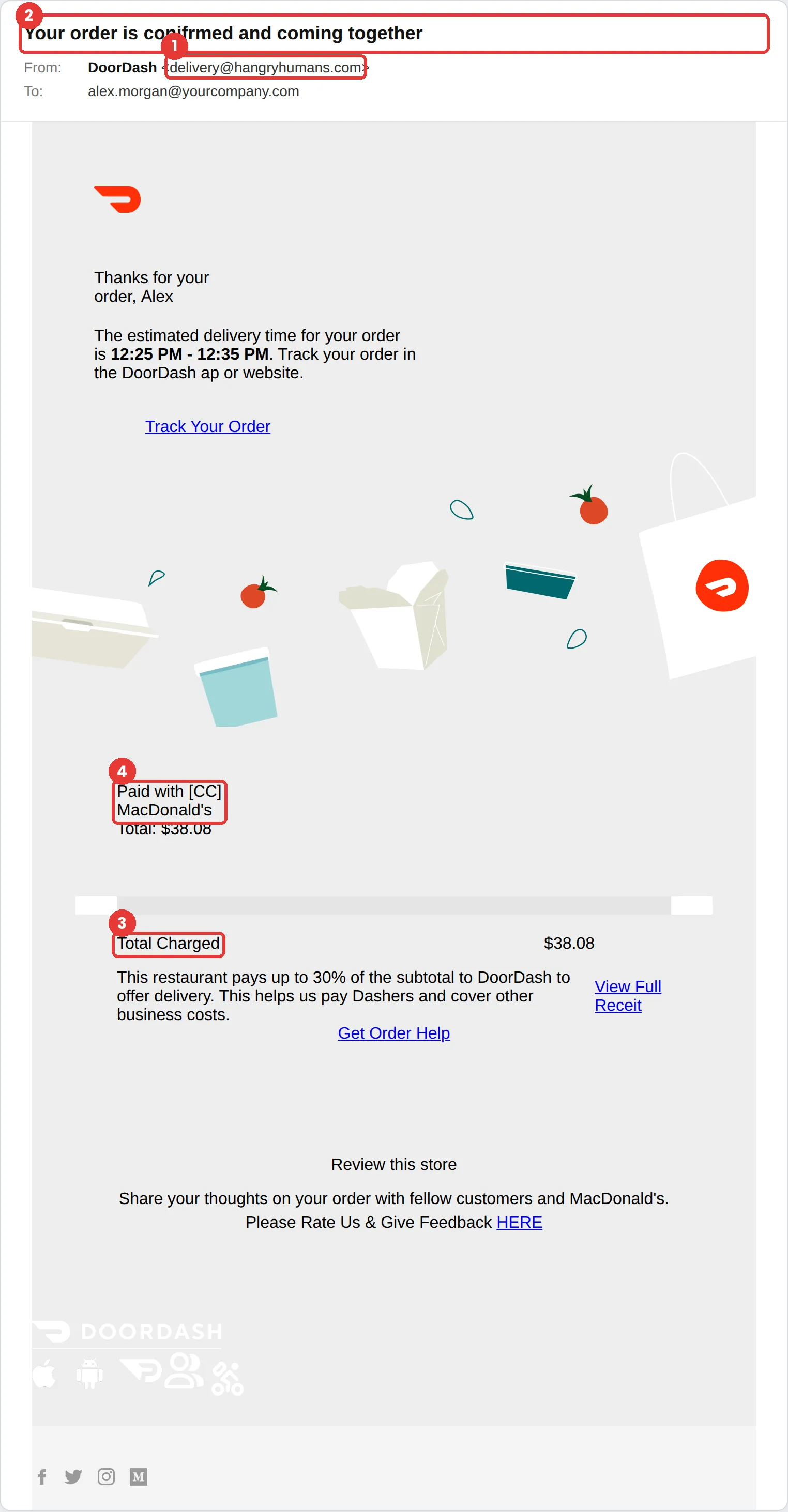
This DoorDash phishing email is a fake order confirmation for a $38.08 “MacDonald’s” delivery you never placed. The tells stack up fast: the sender is delivery@hangryhumans.com, and the email misspells “confirmed,” “app,” “receipt” and McDonald’s. The links push you to “View Full Receit” or “Get Order Help.”
The red flags
- Subject
- Your order is conifrmed and coming together
- From
- delivery@hangryhumans.com
- 1
The sender domain
hangryhumans.com is not DoorDash.
- 2
Spelling mistakes
“conifrmed,” “DoorDash ap,” “Receit” and “MacDonald’s.” Real transactional email is proofread.
- 3
An order you didn’t place
Check your order history in the DoorDash app instead of the email.
- 4
“Paid with [CC]”
A placeholder where the card should be is a sign of a copied, unfinished template.
Why this DoorDash scam works
A charge you don’t recognise triggers an instant urge to fix it, and “Get Order Help” is right there. The email turns your wish to stop an unauthorised order into the click the attacker wanted.
It borrows DoorDash’s red logo and cheerful food illustrations, and food delivery emails are so common that most people barely read them.
The tactic: Trust. The message wears a brand or a colleague you already trust, so scrutiny drops. See all six tactics.
Who gets this email
Food delivery customers, which is most people with a smartphone. A receipt for an order you didn’t place creates instant worry about a stolen account or card, and that worry drives the click.
Other versions of this scam
- A “your refund is being processed” email that asks you to confirm card details.
- A free-delivery or credit offer that asks you to sign in.
- A fake Dasher or driver message about a delivery problem.
Check it in 30 seconds
- Read the sender domain before the receipt.
- Look for spelling mistakes in the subject and body.
- Check your order history in the app, not the email.
- If a real charge appears, contact support from the app.
What happens if someone clicks
The Get Order Help and receipt links in an email like this usually lead to a fake sign-in or support page that asks you to confirm your card to “reverse the charge.” The attacker then has a working card number and a login for an account with your address and saved payment details.
How to report a DoorDash phishing email
- At work, use your email’s Report Phishing button, or forward the message to your IT or security team, before anything else. They can pull the same email from everyone else’s inbox.
- DoorDash’s account-safety guidance tells people to contact DoorDash Support through the app rather than responding to the message. DoorDash account safety
- Forward the email to the Anti-Phishing Working Group at reportphishing@apwg.org. APWG reporting
- If you lost money or shared personal details, report it to the FTC. ReportFraud.ftc.gov
Already clicked? Close the page, change the password for any account you entered, sign out of active sessions, and report it anyway. Speed matters far more than blame.
Questions about DoorDash phishing emails
No. Contact support through the app or the company’s official website. Phone numbers in phishing emails often connect to scammers posing as support.
Open the DoorDash app directly and check your order history. If there is a real unauthorised order, contact support from the app and change your password. Don’t use links in the email.
Sometimes it is carelessness, and sometimes it is deliberate, to get past filters or to find readers who don’t look closely. Either way, real companies proofread their receipts.
It is a phishing simulation template from Hook Security’s library, modelled on real attacks. Links and tracking have been removed from the screenshot.
Give your team a safe first encounter with emails like this.
Hook sends realistic simulations built from real attacks, then a short training moment right after any click. It runs on Autopilot.