Phishing email example · Tactic: Authority
DocuSign phishing email example: fake signature request
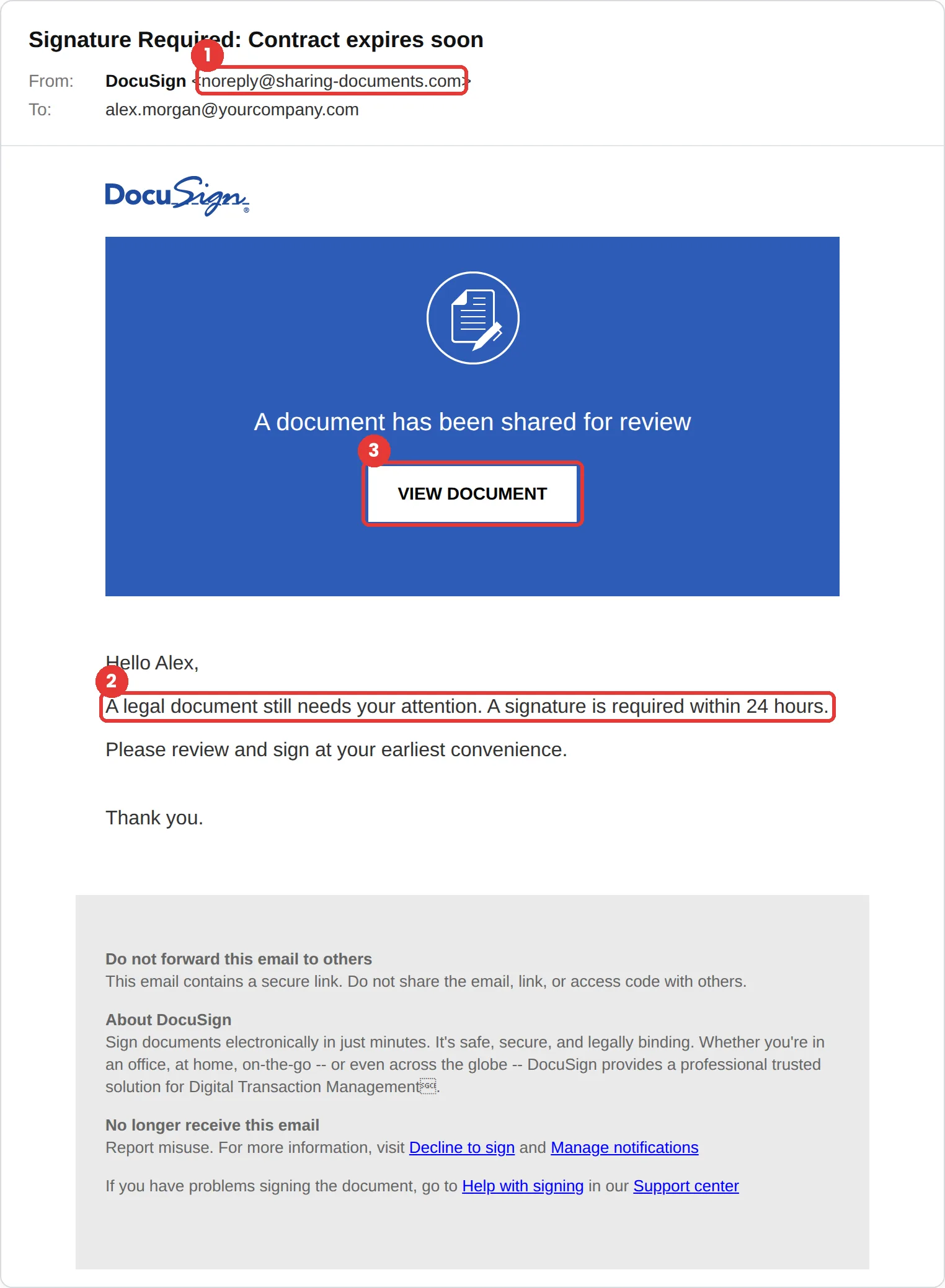
This DocuSign phishing email says a legal document needs your signature within 24 hours and offers a View Document button. The tell is the sender, noreply@sharing-documents.com. DocuSign says real email comes from docusign.com or docusign.net, and this one never says who sent the document or what it is.
The red flags
- Subject
- Signature Required: Contract expires soon
- From
- noreply@sharing-documents.com
- 1
Not a DocuSign domain
sharing-documents.com is not docusign.com or docusign.net.
- 2
No sender, no document name, a deadline
It only says “a legal document” needs signing within 24 hours. There is nobody named and nothing you can check.
- 3
View Document leads to a sign-in
In an attack, the button opens a fake Microsoft, Google or DocuSign login “to access the document.”
Why this DocuSign scam works
Contracts carry weight. A legal document with a 24-hour deadline suggests consequences, and at work a signature request looks like normal business: HR forms, vendor agreements, renewals.
It copies DocuSign’s blue design and even its real footer wording, including “Do not forward this email to others.” That borrowed caution makes the email feel secure.
The tactic: Authority. It appears to come from someone senior, and questioning them feels costly. See all six tactics.
Who gets this email
People who sign things for work: managers, HR and finance staff, sales teams and anyone who deals with vendors or contracts. Because e-signatures are routine, it also works on people who rarely sign anything and don’t know what a real request looks like.
Other versions of this scam
- An invoice or payment authorisation “sent via DocuSign.”
- An HR policy or bonus document that needs your signature.
- A completed-document notice asking you to sign in to download a copy.
Check it in 30 seconds
- Read the sender domain. It should be docusign.com or docusign.net.
- Ask whether you were expecting a document, and from whom.
- Open DocuSign directly and look for the document there, or ask the sender through a channel you already use.
- Never sign in to view a document from an email link.
What real DocuSign email looks like
- DocuSign advises checking that the email came from docusign.com or docusign.net, says genuine signing requests never include attachments, and suggests reviewing documents by going to its website directly. Source: Docusign blog
What happens if someone clicks
View Document in an email like this usually opens a fake sign-in page for Microsoft 365, Google or DocuSign, presented as the step needed to open the file. A captured work login gives the attacker your mailbox, and invoice or payment-change emails sent from a real, trusted account are among the most costly kinds of fraud.
How to report a DocuSign phishing email
- At work, use your email’s Report Phishing button, or forward the message to your IT or security team, before anything else. They can pull the same email from everyone else’s inbox.
- DocuSign asks for suspicious emails to be forwarded as an attachment to verify@docusign.com, and then deleted. Docusign incident reporting
- Forward the email to the Anti-Phishing Working Group at reportphishing@apwg.org. APWG reporting
Already clicked? Close the page, change the password for any account you entered, sign out of active sessions, and report it anyway. Speed matters far more than blame.
Questions about DocuSign phishing emails
DocuSign says to check that the email came from docusign.com or docusign.net. A signing request from any other domain, like sharing-documents.com, should be treated as phishing.
DocuSign says genuine signing requests never include attachments. Documents are opened and signed on DocuSign itself.
Forward it as an attachment to verify@docusign.com and then delete it, as DocuSign asks. At work, report it to your IT or security team first.
It is a phishing simulation template from Hook Security’s library, modelled on real attacks. Links and tracking have been removed from the screenshot.
Give your team a safe first encounter with emails like this.
Hook sends realistic simulations built from real attacks, then a short training moment right after any click. It runs on Autopilot.