Phishing email example · Tactic: Trust
Box phishing email example: fake folder share invite
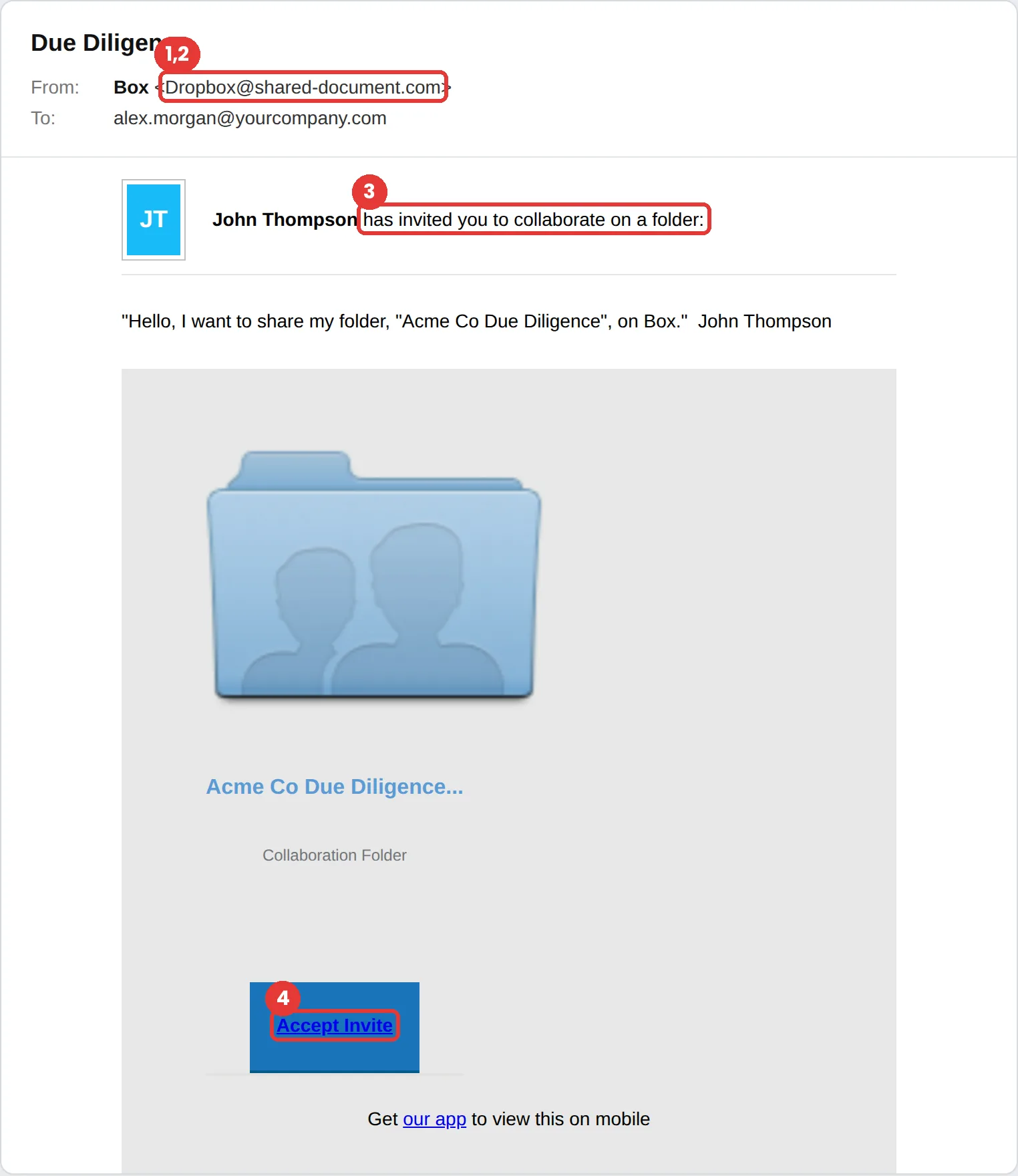
This Box phishing email invites you to collaborate on a folder called “Due Diligence” and asks you to click Accept Invite. The tell: it claims to be from Box but the sender is Dropbox@shared-document.com, a different brand on an unrelated domain. File-share invites like this usually lead to a fake sign-in page.
The red flags
- Subject
- Due Diligence
- From
- Dropbox@shared-document.com
- 1
The brands don’t match
The email says Box, and the sender address says Dropbox. Attackers reuse templates and forget to change details.
- 2
An unrelated domain
shared-document.com sounds official but belongs to neither Box nor Dropbox.
- 3
A stranger sharing sensitive files
Were you expecting a due diligence folder from someone called John Thompson? If not, confirm with them on another channel.
- 4
Accept leads to a sign-in
If accepting a share asks for your password, stop. You should already be signed in, or the link should open inside the Box app.
Why this Box scam works
Shared-folder invites are routine at work, and a folder named after a sensitive project (“Due Diligence,” with your company’s name in it) feels both legitimate and a little urgent. People accept these without thinking because they accept real ones every day.
The sender, “John Thompson,” is vague enough to be anyone: a new colleague, a client, an auditor. The simple layout mirrors how real file-sharing notifications look.
The tactic: Trust. The message wears a brand or a colleague you already trust, so scrutiny drops. See all six tactics.
Who gets this email
Office staff who share files with clients and vendors all day, and finance or legal teams, where a “Due Diligence” folder looks routine. File-share invites are one of the most common first steps in credential theft at work.
Other versions of this scam
- A “document shared with you” invite that opens a fake Microsoft 365 or Google sign-in page.
- A voicemail or fax “delivered as a shared file.”
- An invoice or contract folder shared by a lookalike of a real vendor.
Check it in 30 seconds
- Check that the sender’s brand and domain both match the service named in the email.
- Ask the person, on another channel, whether they meant to share it.
- Open the file-sharing app directly and look under Shared with Me.
- Never type your password after clicking a share link.
What happens if someone clicks
Accepting a fake share invite usually leads to a sign-in page for Microsoft 365, Google or the file-sharing service itself. The attacker collects the password and sometimes the one-time code too, then signs in as you. From there they can read email, reach shared drives, and send the same invite to your contacts from a real, trusted account, which is how one click spreads through a company.
How to report a Box phishing email
- At work, use your email’s Report Phishing button, or forward the message to your IT or security team, before anything else. They can pull the same email from everyone else’s inbox.
- If a phishing file is hosted on Box, Box says to open the file preview, select the ellipsis menu and choose Report Abuse. For other suspicious messages, Box points customers to their Box admin or Box Support. Box phishing guidance
- Forward the email to the Anti-Phishing Working Group at reportphishing@apwg.org. APWG reporting
Already clicked? Close the page, change the password for any account you entered, sign out of active sessions, and report it anyway. Speed matters far more than blame.
Questions about Box phishing emails
Change the password immediately from a device you trust, sign out of other sessions, and tell your IT team. They can check for mailbox rules or forwarding the attacker may have added.
Open Box directly and check your notifications or the Shared with Me list. A real invite will be there. Also check that the sender address matches Box and that you know the person sharing.
Because people accept shares all day, and a share naturally leads to a sign-in page. That makes credential theft look like a normal step.
It is a phishing simulation template from Hook Security’s library, modelled on real attacks. Links and tracking have been removed from the screenshot.
Give your team a safe first encounter with emails like this.
Hook sends realistic simulations built from real attacks, then a short training moment right after any click. It runs on Autopilot.