Phishing email example · Tactic: Urgency
ExpressVPN phishing email example: fake failed payment notice
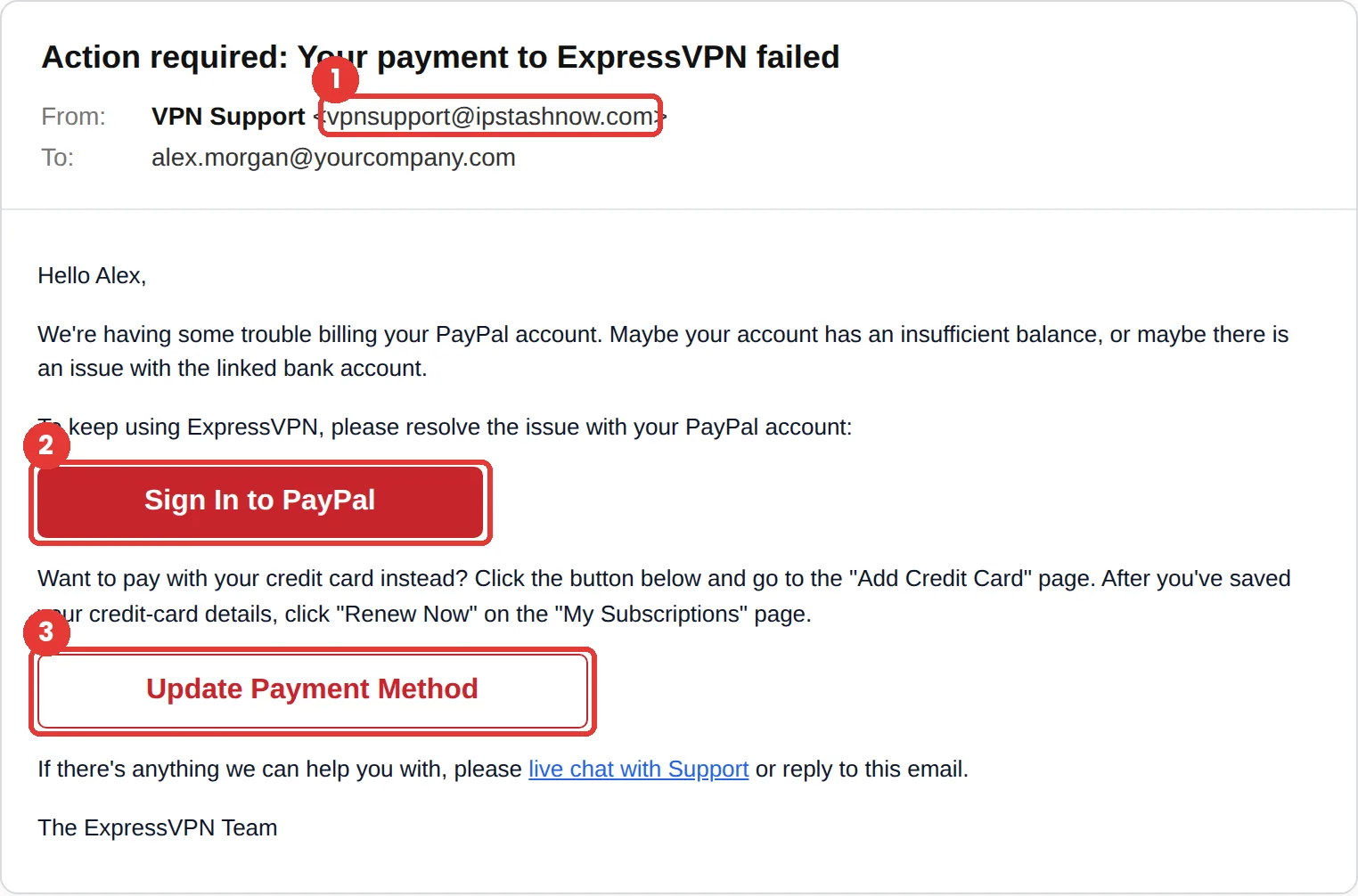
This ExpressVPN phishing email says your PayPal payment for the VPN failed and asks you to sign in to PayPal or add a card. The tell is the sender, vpnsupport@ipstashnow.com, which has nothing to do with ExpressVPN. It uses two trusted brands to collect one set of payment details.
The red flags
- Subject
- Action required: Your payment to ExpressVPN failed
- From
- vpnsupport@ipstashnow.com
- 1
An unrelated sender domain
ipstashnow.com is neither ExpressVPN nor PayPal.
- 2
A sign-in button for a different company
A VPN email that sends you to sign in to PayPal is handing you to a page the sender controls.
- 3
Card details by email
The second button asks you to add a credit card. Payment changes belong in your account, opened from the app or a website you type in yourself.
Why this ExpressVPN scam works
Subscription renewals fail all the time, so a billing problem is believable. The email even offers two plausible causes, a low balance or a problem with a linked bank account, so it reads like a polite service notice rather than a threat.
It borrows two brands at once. People who pay for a VPN through PayPal expect to see both names together, and a big red Sign In to PayPal button feels like the natural next step. “To keep using ExpressVPN” quietly adds the fear of losing a tool you rely on.
The tactic: Urgency. A deadline collapses the gap between reading and acting. You react before you evaluate. See all six tactics.
Who gets this email
VPN subscribers, especially people who travel or work remotely and use the VPN every day. The fear of losing a privacy tool mid-trip is exactly what the email plays on. Some versions go to employees at companies that use a VPN for remote access.
Other versions of this scam
- A “your subscription has expired” notice with a renewal link.
- A fake app update or new-version email with a download link.
- A “we detected a leak on your connection” alert asking you to sign in.
Check it in 30 seconds
- Read the sender domain.
- Open the VPN app, or type the website yourself, and look at your subscription status.
- Check PayPal directly for any failed payment.
- Only download VPN apps from the official website or your device’s app store.
What happens if someone clicks
The Sign In to PayPal button usually opens a fake PayPal login page, and Update Payment Method a fake card form. Either way, the attacker gets payment access. A stolen PayPal login can be used to send money or make purchases, and a card number can be used or sold within hours.
How to report a ExpressVPN phishing email
- At work, use your email’s Report Phishing button, or forward the message to your IT or security team, before anything else. They can pull the same email from everyone else’s inbox.
- ExpressVPN doesn’t list a dedicated phishing-report address, so use the general channels below.
- Forward the email to the Anti-Phishing Working Group at reportphishing@apwg.org. APWG reporting
- If you lost money or shared personal details, report it to the FTC. ReportFraud.ftc.gov
Already clicked? Close the page, change the password for any account you entered, sign out of active sessions, and report it anyway. Speed matters far more than blame.
Questions about ExpressVPN phishing emails
Check the sender domain first, then open the ExpressVPN app or type the website yourself and look at your subscription there. A real billing problem will show up in your account.
Yes. ExpressVPN warns that fake apps can fail to encrypt your traffic, send your data to other servers, install malware or harvest your account login. Only install it from the official website or a major app store.
Call your card issuer using the number on the back of the card and cancel it, then watch your statements. If you entered a PayPal password, change it on the real site and turn on two-step verification.
It is a phishing simulation template from Hook Security’s library, modelled on real attacks. Links and tracking have been removed from the screenshot.
Give your team a safe first encounter with emails like this.
Hook sends realistic simulations built from real attacks, then a short training moment right after any click. It runs on Autopilot.