Phishing email example · Tactic: Trust
Google phishing email example: fake critical security alert
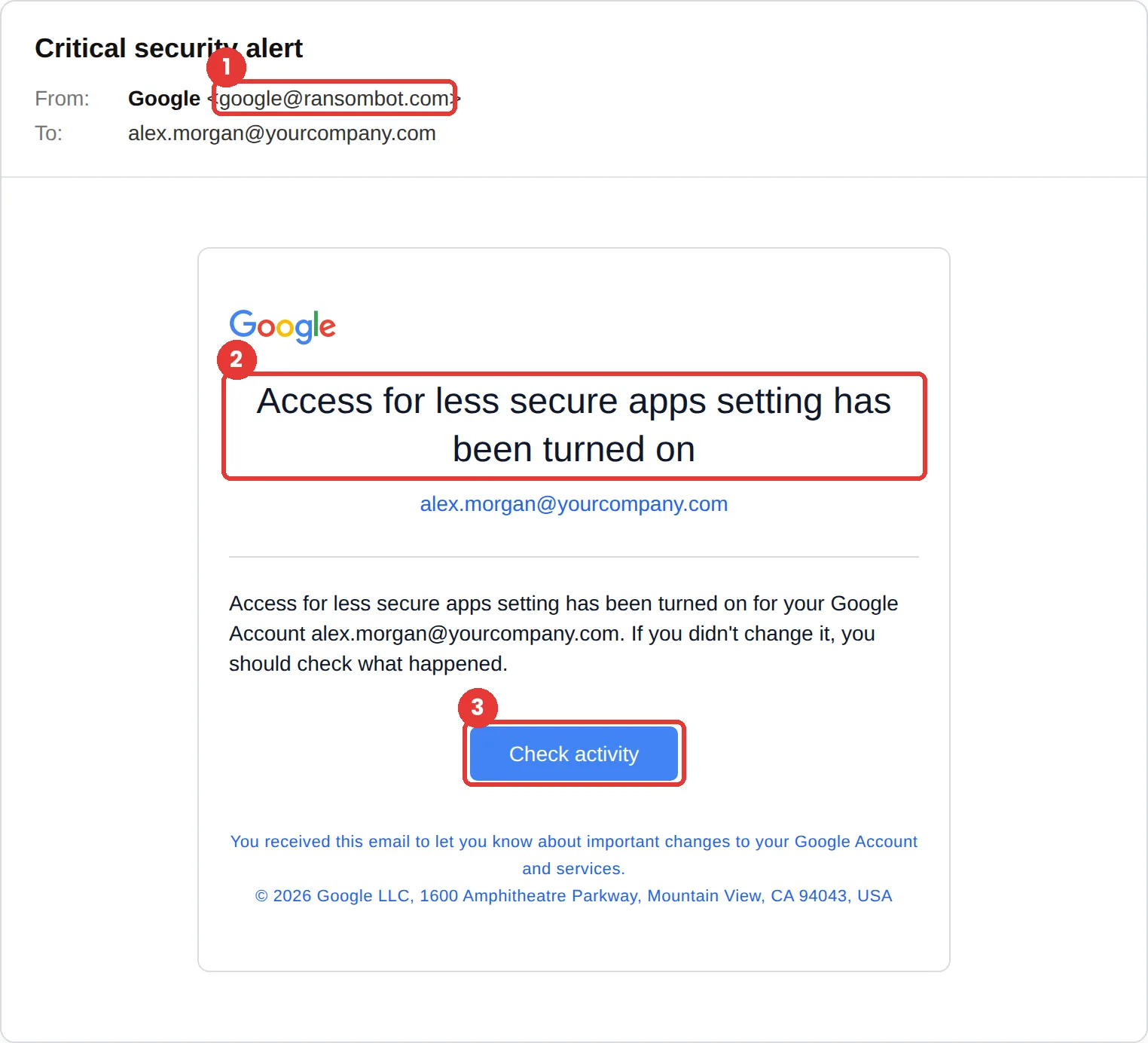
This Google phishing email is a “Critical security alert” saying access for less secure apps was turned on for your account, with a Check activity button. The tell is the sender, google@ransombot.com. The email copies Google’s real security alert design almost exactly, so the sender is the most reliable clue.
The red flags
- Subject
- Critical security alert
- From
- google@ransombot.com
- 1
A sender that isn’t Google
ransombot.com has nothing to do with Google, whatever the display name says.
- 2
A setting Google has been retiring
Google says that from January 2025, apps that sign in with only a username and password are no longer supported for Workspace accounts. An alert that this access was just switched on should make you stop.
- 3
Check activity goes somewhere else
Hover over the button before clicking. A real alert can always be checked by opening your Google Account yourself.
Why this Google scam works
It is a near-perfect copy of a real Google security alert: the logo, the card layout, the blue button, even the footer address. Security alerts are meant to be acted on quickly, and this one looks like it came from the system that protects your account.
It also turns a good habit against you. People are rightly told to respond to security alerts, so clicking Check activity feels like the responsible thing to do.
The tactic: Trust. The message wears a brand or a colleague you already trust, so scrutiny drops. See all six tactics.
Who gets this email
Anyone with a Gmail or Google Workspace account. It lands well at work, where people know that a compromised Google account means compromised email, Drive and calendar, and want to act fast.
Other versions of this scam
- A “new sign-in on a Windows device” alert.
- A “your storage is full” warning asking you to sign in and upgrade.
- A shared Google Doc or Drive file that asks you to sign in to view it.
Check it in 30 seconds
- Read the sender address. This one isn’t Google.
- Don’t use the button. Go to myaccount.google.com yourself and review recent security activity.
- If the alert is real, you will see the same event in your account.
- Report it in Gmail with Report phishing.
What real Google email looks like
- Google says that starting January 2025, less secure apps, third-party apps or devices that sign in with only a username and password are no longer supported for Google Workspace accounts. Source: Google Account Help
What happens if someone clicks
Check activity in an email like this usually leads to a copy of the Google sign-in page, sometimes one that also asks for your two-step verification code. With both, the attacker can take over your Google Account, and with it your email, Drive files and any service where you sign in with Google.
How to report a Google phishing email
- At work, use your email’s Report Phishing button, or forward the message to your IT or security team, before anything else. They can pull the same email from everyone else’s inbox.
- In Gmail, open the message, choose More next to Reply, then Report phishing. Gmail Help
- Report the fake page the email links to through Google Safe Browsing. Report to Safe Browsing
- Forward the email to the Anti-Phishing Working Group at reportphishing@apwg.org. APWG reporting
Already clicked? Close the page, change the password for any account you entered, sign out of active sessions, and report it anyway. Speed matters far more than blame.
Questions about Google phishing emails
Don’t judge by the design, which is easy to copy. Go to myaccount.google.com yourself and check recent security activity. If the alert is real, the same event will be there.
Apps and devices that sign in to a Google Account with only a username and password. Google has been phasing them out and says they are no longer supported for Workspace accounts from January 2025.
In Gmail, open the message, choose More next to Reply, then Report phishing. You can also report the fake page to Google Safe Browsing.
It is a phishing simulation template from Hook Security’s library, modelled on real attacks. Links and tracking have been removed from the screenshot.
Give your team a safe first encounter with emails like this.
Hook sends realistic simulations built from real attacks, then a short training moment right after any click. It runs on Autopilot.