Phishing email example · Tactic: Authority
Calendly phishing email example: fake meeting with management
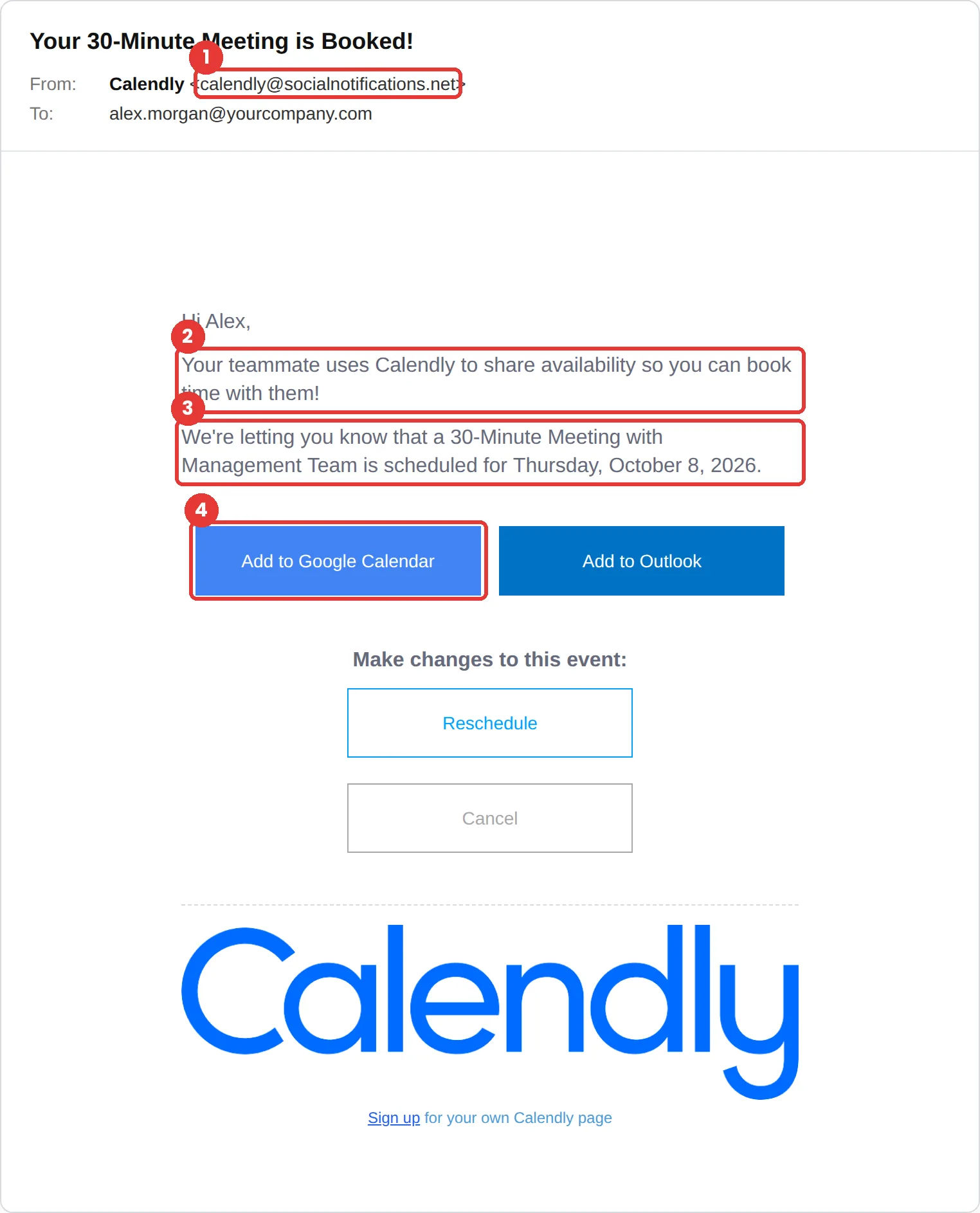
This Calendly phishing email says a 30-minute meeting with your Management Team has been booked and asks you to add it to your calendar. The tell is the sender: Calendly sends email confirmations from notifications@calendly.com, not socialnotifications.net. A surprise meeting with management is designed to make you click.
The red flags
- Subject
- Your 30-Minute Meeting is Booked!
- From
- calendly@socialnotifications.net
- 1
The wrong sending domain
Calendly sends email confirmations from notifications@calendly.com. socialnotifications.net is someone else.
- 2
A teammate with no name
“Your teammate” keeps it vague, so it could be anyone. There is no person here you can check with.
- 3
Management, and no agenda
A meeting with the “Management Team” and no topic plays on worry about what it might mean.
- 4
Buttons that lead to a sign-in
Add to Google Calendar is the obvious click. In an attack it leads to a fake Google or Microsoft sign-in page.
Why this Calendly scam works
A meeting with management that you didn’t arrange is unsettling. Is it a review? Is something wrong? Curiosity and a little anxiety make people click to find out.
It is also completely ordinary. Calendar invitations arrive all day, the email copies Calendly’s real layout and buttons, and adding an event to your calendar feels harmless. Nothing asks for a password until after the click.
The tactic: Authority. It appears to come from someone senior, and questioning them feels costly. See all six tactics.
Who gets this email
Employees at any company that books meetings online, which is most of them. It works especially well on new starters, people expecting a review, and anyone whose manager really does use Calendly.
Other versions of this scam
- A “meeting cancelled, please reschedule” notice.
- An invitation from a supposed client or recruiter with a booking link.
- A shared agenda or document attached to the booking that asks you to sign in to read it.
Check it in 30 seconds
- Check the sending domain. Real confirmations come from calendly.com.
- Ask who booked it. If no name is given, ask your manager directly.
- Look for the event in your own calendar instead of using the email’s buttons.
- Never enter a password to view an agenda or accept an invitation.
What real Calendly email looks like
- Calendly says its email confirmations are sent from notifications@calendly.com, and that calendar invitations come from the organiser’s own connected calendar account. Source: Calendly Help
What happens if someone clicks
In an attack, the calendar buttons usually open a fake Google or Microsoft sign-in page that says you need to log in to add the event. A captured work password gives the attacker your email, files and calendar, and the ability to send convincing meeting invitations to your colleagues.
How to report a Calendly phishing email
- At work, use your email’s Report Phishing button, or forward the message to your IT or security team, before anything else. They can pull the same email from everyone else’s inbox.
- Calendly asks people to report abusive activity by contacting its support team with details of what happened. Calendly: report abuse
- Forward the email to the Anti-Phishing Working Group at reportphishing@apwg.org. APWG reporting
- If you lost money or shared personal details, report it to the FTC. ReportFraud.ftc.gov
Already clicked? Close the page, change the password for any account you entered, sign out of active sessions, and report it anyway. Speed matters far more than blame.
Questions about Calendly phishing emails
Calendly says email confirmations come from notifications@calendly.com. Calendar invitations are sent from the organiser’s own connected calendar account.
Because invitations are routine and trusted, and the natural action, adding the event to your calendar, can be turned into a sign-in request. Mentioning management adds just enough worry to make people click.
Report it to your IT or security team first. Calendly asks for abuse to be reported to its support team, and you can forward the email to the APWG at reportphishing@apwg.org.
It is a phishing simulation template from Hook Security’s library, modelled on real attacks. Links and tracking have been removed from the screenshot.
Give your team a safe first encounter with emails like this.
Hook sends realistic simulations built from real attacks, then a short training moment right after any click. It runs on Autopilot.