Phishing email example · Tactic: Urgency
FedEx phishing email example: fake missed delivery notice
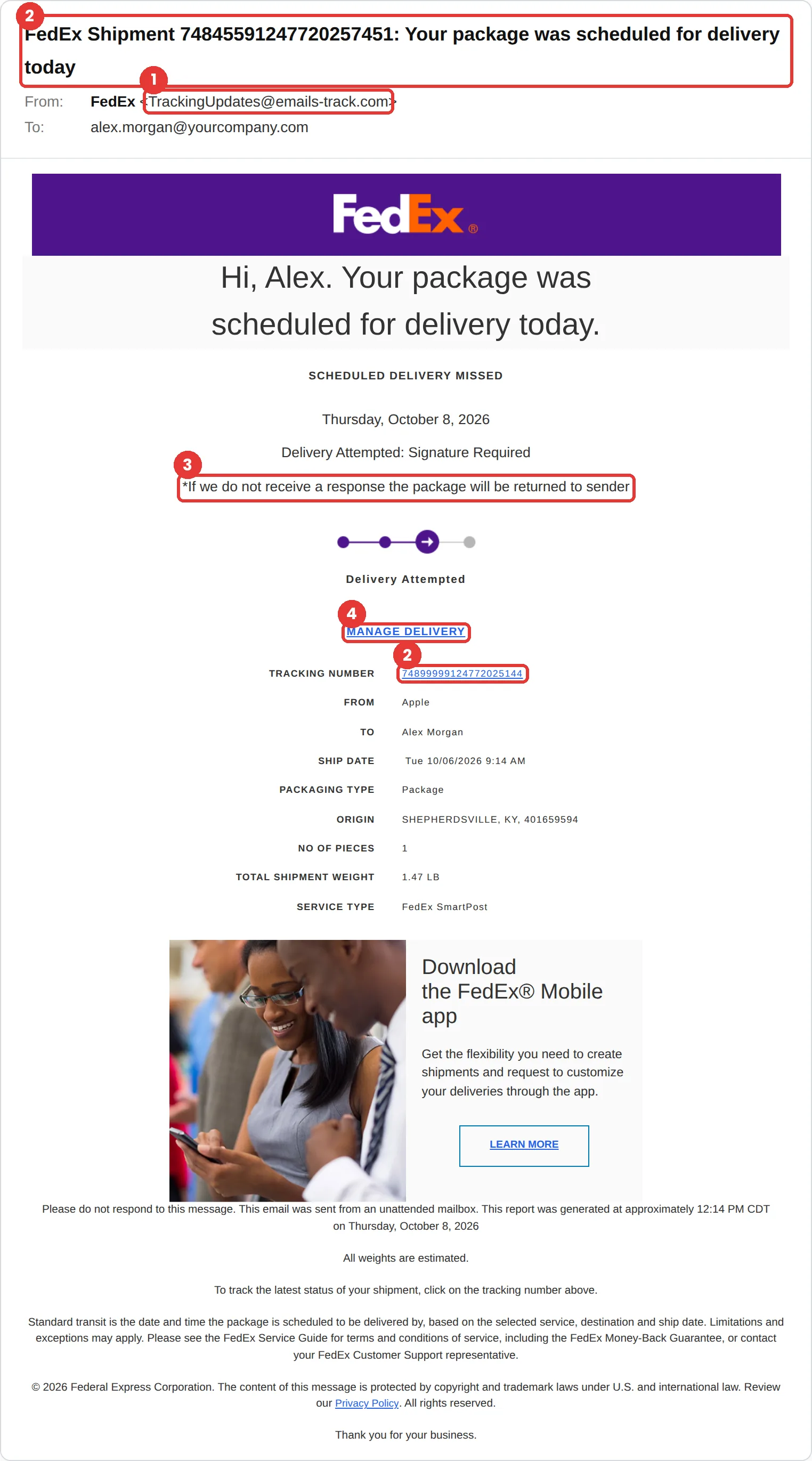
This FedEx phishing email says a delivery was attempted, a signature is required, and the package will go back to the sender unless you respond. The tell is the sender, TrackingUpdates@emails-track.com, which isn’t FedEx. The tracking number in the subject doesn’t match the one in the email either.
The red flags
- Subject
- FedEx Shipment 74845591247720257451: Your package was scheduled for delivery today
- From
- TrackingUpdates@emails-track.com
- 1
A generic tracking domain
emails-track.com is not FedEx.
- 2
Two different tracking numbers
The subject says 74845591247720257451. The body says 74899999124772025144. A real notice uses one.
- 3
Return-to-sender pressure
“If we do not receive a response the package will be returned to sender” is there to rush you.
- 4
Manage Delivery is the trap
Check any delivery by typing the tracking number into fedex.com yourself.
Why this FedEx scam works
Almost everyone is waiting for a package at some point, and a missed delivery is a small, familiar problem. The threat that it will be returned to the sender is just strong enough to make people click Manage Delivery without thinking.
The email is packed with convincing detail: a progress tracker, a tracking number, a ship date, a weight, an origin, a service type and the familiar purple FedEx header. So much real-looking data makes it hard to notice that none of it is yours.
The tactic: Urgency. A deadline collapses the gap between reading and acting. You react before you evaluate. See all six tactics.
Who gets this email
Anyone who orders online, which means almost everyone, and especially people who work from home or run a small business with regular deliveries. It is most convincing around the holidays, when nearly everyone is expecting something.
Other versions of this scam
- A text message about a delivery fee or customs charge with a payment link.
- An “address incomplete, please confirm” notice.
- A fake invoice or shipping label sent as an attachment.
Check it in 30 seconds
- Read the sender domain.
- Compare the tracking numbers. In this email they don’t match.
- Type the tracking number into fedex.com yourself, or use the FedEx app.
- Remember that FedEx does not ask for payment or personal details to release a package.
What real FedEx email looks like
- FedEx says it never requests payment or personal information in exchange for releasing a package, and does not ask for account credentials or identity details in unsolicited email or texts. Source: FedEx: report fraud
What happens if someone clicks
Manage Delivery usually leads to a fake FedEx page asking you to confirm your address and pay a small redelivery or customs fee. The fee is tiny on purpose: the real goal is your full card number, which is then used for larger purchases or sold.
How to report a FedEx phishing email
- At work, use your email’s Report Phishing button, or forward the message to your IT or security team, before anything else. They can pull the same email from everyone else’s inbox.
- FedEx asks for suspicious messages to be forwarded to abuse@fedex.com. FedEx fraud guidance
- If you lost money or shared personal details, report it to the FTC. ReportFraud.ftc.gov
Already clicked? Close the page, change the password for any account you entered, sign out of active sessions, and report it anyway. Speed matters far more than blame.
Questions about FedEx phishing emails
FedEx says it never requests payment or personal information in exchange for releasing a package. The exception is duties and taxes on international shipments, which FedEx says you can verify through its own tools.
Forward it to abuse@fedex.com, as FedEx asks. At work, report it to your IT or security team first.
Type the tracking number into fedex.com yourself or open the FedEx app. Don’t use the links or phone numbers in the email.
It is a phishing simulation template from Hook Security’s library, modelled on real attacks. Links and tracking have been removed from the screenshot.
Give your team a safe first encounter with emails like this.
Hook sends realistic simulations built from real attacks, then a short training moment right after any click. It runs on Autopilot.